
PDF rota
Print the rota, or save it
as a PDF to share
Not everyone on the day has a charged phone. One click gives you a tidy printout — for the noticeboard, for the race office, or as a personal pack for each volunteer. Choose “Save as PDF” in the print dialogue and you have a file to email instead.
Before you print
You decide what goes on the paper
The print panel opens before anything is sent to the printer, and it tells you how many sheets you're about to produce — so you find out before a shared printer does.
Print rota
×Days
For
Pages
Include
✓Spares for each shift✓Key contactsFit each table on one pageIllustration of the print panel
Days and shifts
Pick any combination of event days, then narrow to individual shifts within them. Print Saturday morning on its own, or the whole weekend in one go.
Everyone, a label, or one person
Print the full rota, or just the people carrying a particular label — marshals, umpires, first aid. Pick individuals and you get a separate set of pages for each one: a personal pack to hand out.
By position, by person, or both
The by-position page is the noticeboard view. The by-person page is what a volunteer wants in their pocket. Print either, or both back to back.
Fit to one page
Off by default, so a long rota stays legible and continues onto another sheet. Turn it on when one sheet matters more than comfort and the table scales down to fit.
Spares for each shift
Print who is free but unassigned for each shift, split from those who never replied — so whoever is running the day knows who they can call on.
Key contacts
Print who to call at the foot of every page. On the day, that's the difference between a phone call and a search party.
Venue and position maps
Add your venue map, your position map, or both as extra sheets — captured from the live maps, so what's printed matches what volunteers see on their phones.
A message at the top or bottom
"Report to the info tent 15 minutes before your shift." Set it once as a header or footer and it's remembered for the next print.
Two views, one printout
The same grids you work in, laid out for paper
What you print is what you've been looking at all along — the by-position grid and the by-person grid — reset in a print layout with the interface stripped out.
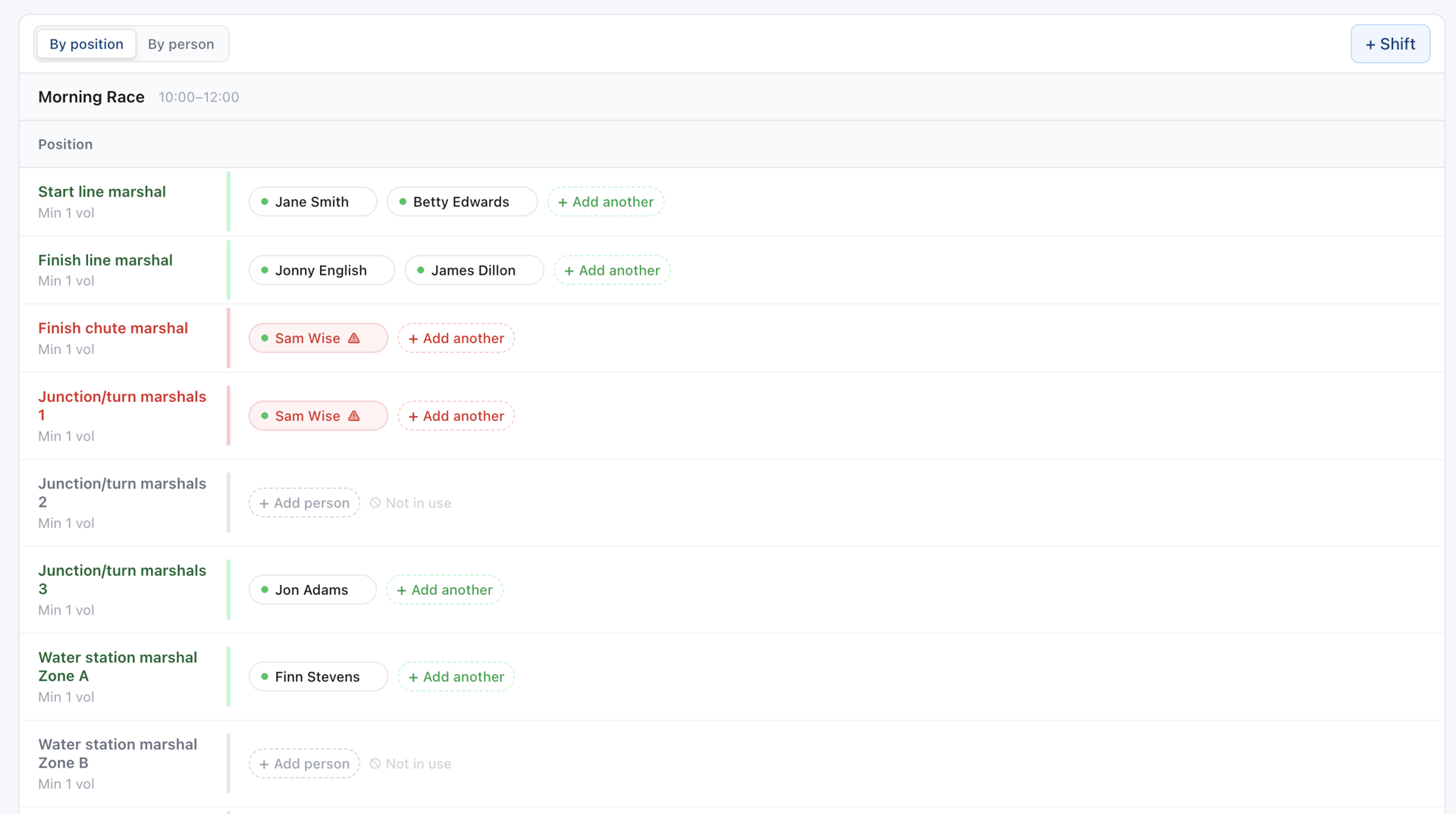
By position — for the noticeboard
Every position against every shift, so anyone walking past can find the role they're looking for and see who is covering it.
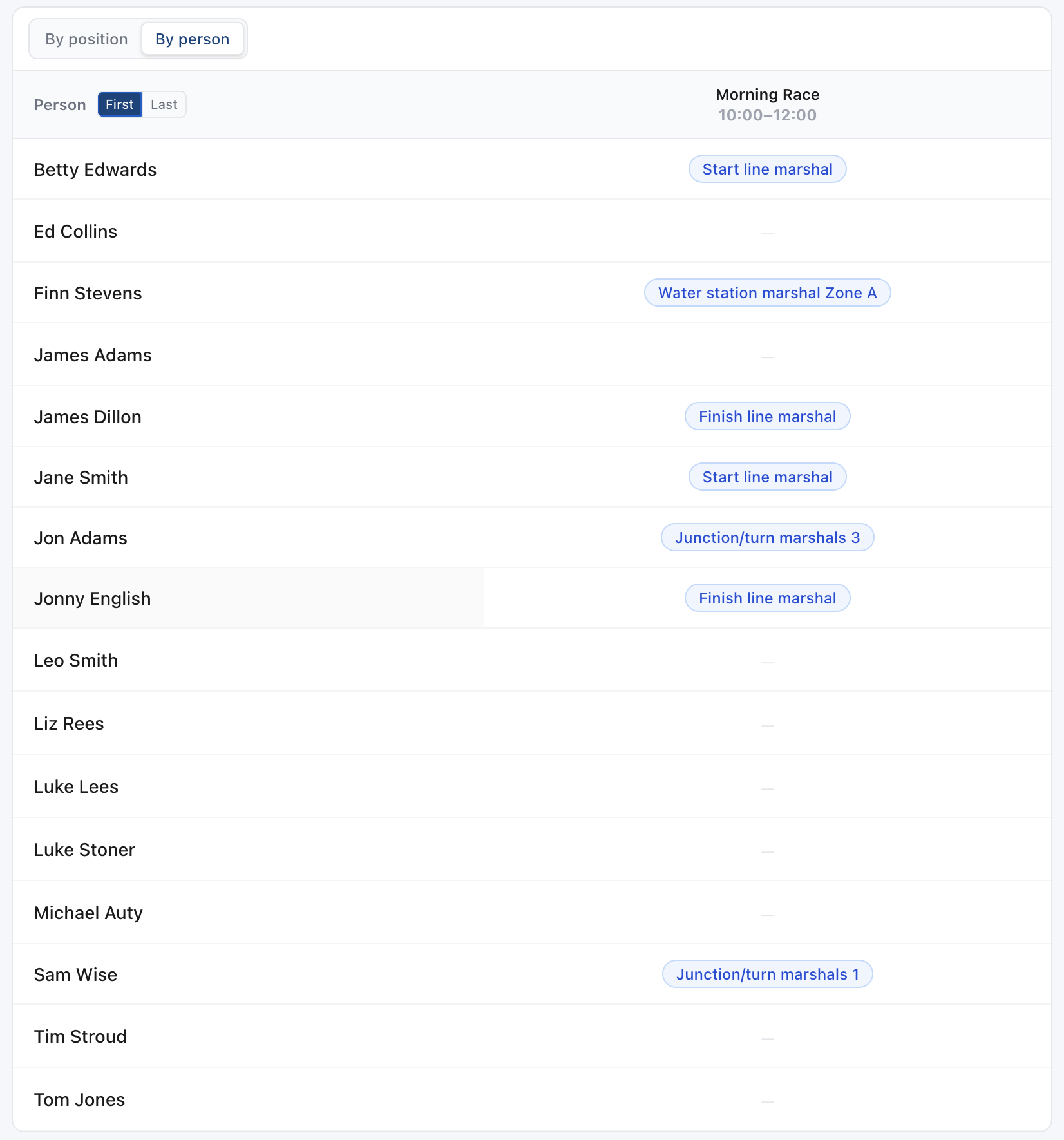
By person — for the handout
One row per volunteer across the day. Print it for the whole team, or pick individuals and get a separate pack for each.
Small things that save you a reprint
Your settings are remembered
Everything except the parts that go stale — which days, shifts and people exist — is kept per event. Print the same rota five times over a weekend and you set it up once.
A page count before you commit
The panel shows how many sheets the current settings will produce, including any map pages. Sixty pages to a shared printer is a mistake you only make once.
Sensible PDF filenames
Save as PDF and the file is named after your event and stamped with the date and time — so a folder of printouts sorts in chronological order instead of reading "document (3)".
Common questions
How do I get a PDF rather than paper?
Print, then choose "Save as PDF" as the destination in your browser's print dialogue — it's available in Chrome, Edge, Safari and Firefox on desktop. You get a file you can email or upload to your event documents.
Can I print one page per volunteer?
Yes. Set the audience to "Individual", pick the people you want, and you get a separate set of pages for each of them. Ideal for handing out at sign-in or stuffing into volunteer packs.
Will a long rota still be readable?
By default a table too tall for a sheet continues onto the next one, which keeps the type at a comfortable size. "Fit each table on one page" scales it down instead — useful for a single sheet, but check the preview first on a very long rota.
Can I include the venue map?
Yes. If you've placed pins on your venue map or your position map, either or both can be added as extra sheets, captured from the live map so the printed version matches what volunteers see.
Can I print the coverage report as well?
Yes — that's a separate export from the Coverage page, summarising where you're short and what to do about it. It's the one to send to a committee before the event, where the rota printout is the one for the day itself.
Do volunteers need the printout?
No — they can see their shifts on their phone, in the app or on the web. The printout is for the people who'd rather have paper, for the noticeboard, and for the race office desk.
Ready for the noticeboard
Free for up to 10 people per event. No credit card needed.
Get started